





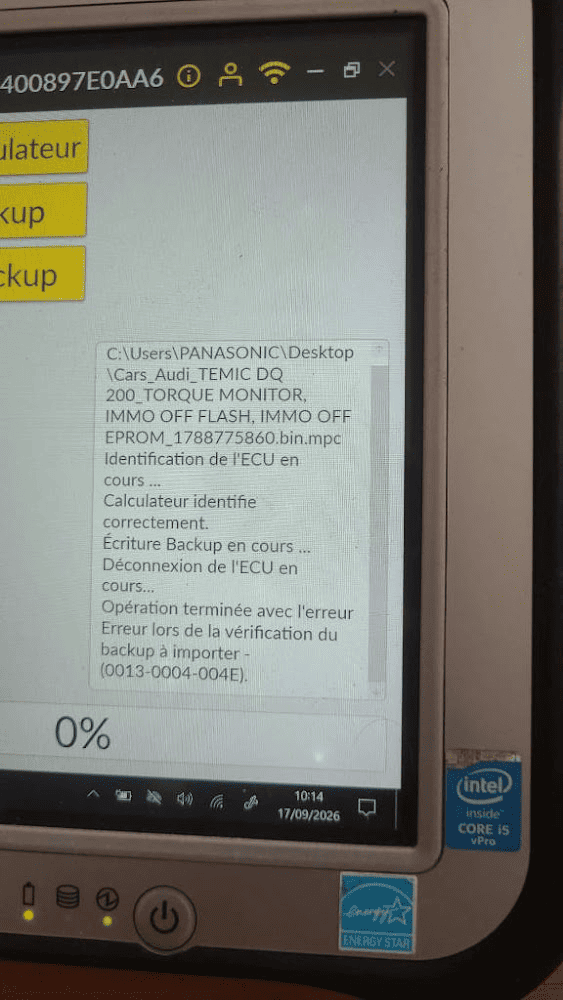
When programming a Temic DSG DQ200 TCU from a 2013 Audi A3 using KESS3 Slave in Bench Mode (Protocol 1545), you may encounter error 0013-0004-004E during backup import.
In this case, the original TCU was completely inaccessible, so a full backup could not be read. The Master provided two original Alientech files: a `.mpc` Micro file and a `.eep` EEPROM file. However, the individual Micro and EEPROM write options were greyed out, and importing the files through the Write Backup function resulted in an immediate error at 0%.
According to technical support, the issue involves both file preparation and TCU compatibility.
1. KESS3 Slave Requires Master-Prepared Files
KESS3 Slave cannot simply use the separate raw files provided in this case to start programming.
The Master must first synthesize the files using the Master software. Only after the files have been properly prepared by the Master can the Slave proceed with the writing operation.
Therefore, if you receive separate `.mpc` and `.eep` files, ask your Master to process them before attempting to write them with KESS3 Slave.
2. Check TCU Hardware and Software Versions
If the original TCU cannot be read or written and you are using a used replacement unit, file compatibility is critical.
There are two possible approaches
Option 1: OEM Online Programming
Before installing the replacement TCU in the vehicle, perform online programming using a suitable OEM diagnostic tool.
Option 2: Clone Using Matching Files
If OEM online programming is not available, identify the replacement TCU’s hardware (HW) and software (SW) versions using a suitable diagnostic tool, such as a compatible LAUNCH X431 or Autel device.
Then locate a file that matches the TCU’s HW and SW versions before proceeding with cloning.
Do not attempt to write an unverified or mismatched file. If you cannot find a matching file, stop the programming process. An incorrect file may damage the TCU.
3. Why Does KESS3 Show Error 0013-0004-004E?
In this case, KESS3 blocks the writing operation because the file being used is not suitable for the target TCU.
The error occurs during backup validation, and the system prevents the operation from proceeding to protect the module.
Simply having the correct vehicle model and transmission type is not enough. The files must be properly prepared by the Master and must match the target TCU.
When programming a DSG DQ200 TCU with KESS3 Slave, make sure KESS3 Master has properly synthesized the files before writing.
If the original TCU is inaccessible, verify the replacement unit’s HW/SW versions and obtain a matching file. Never force a write with an unverified file, as this could damage the TCU.
