

Problem Description
A customer reported that the VNCI 6154A (SP447) could not communicate with the diagnostic software after a firmware update.
The customer had tested different firmware versions, including V1.2.0.2 and V1.1.8.5, but neither version worked correctly.
Possible Cause
The issue may be related to firmware and software compatibility rather than a hardware failure.
Recommended Checks
After updating the firmware to version V1.2.0.2, a “USB not recognized” notification may appear; this does not affect functionality and will disappear after about three seconds. If the device fails to connect to the software, check the VNCI 6154A Device Manager to see if it indicates that the driver is unlocked—when using ODIS software version V26, the status must show as “unlocked.”
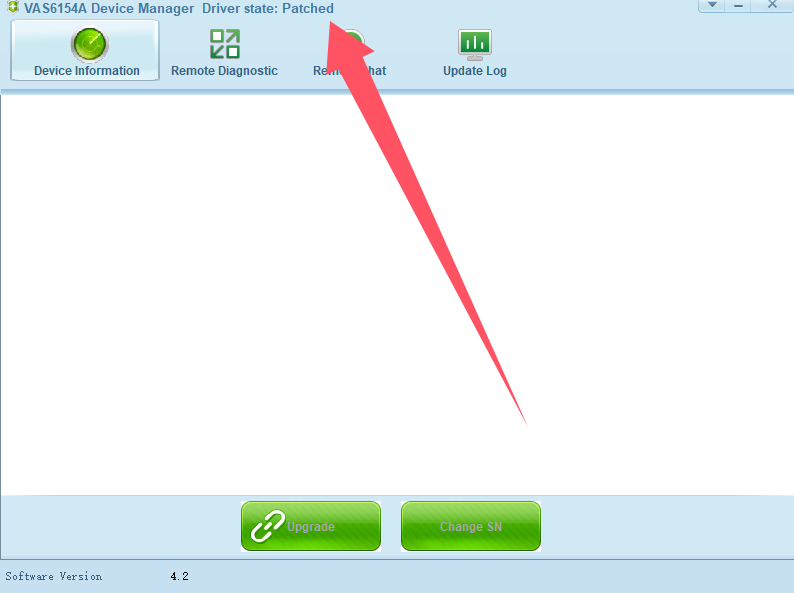
If the status indicates otherwise, completely close the ODIS software, then launch the VNCI 6154A Device Manager and wait a few seconds for the “unlocked” notification to appear; the device should then work correctly.
Contact us
WhatsApp: +86 150 0270 5698
Phone: +86 150 0270 5698
E-Mail: sales@CardiagTool.co.uk
